Chatview · Android
Chatview Find the message behind a passing notification.
Bring new message notifications from supported apps into one conversation inbox. Check saved content before opening the original messenger and search for words you remember.
Website translations are separate from app language support.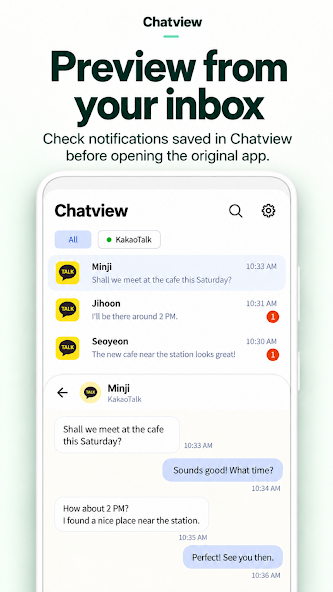
A place to revisit message notifications
Read by conversation
Browse messages exposed in notifications from supported apps in one inbox.
View received images
Preview images when the original notification provides accessible image content.
Search remembered words
Find a sender or message text already saved on this device.
For missed notifications and busy conversations
Use Chatview when you want to revisit notifications from supported messaging or SMS apps, read saved conversations or search for a message. You choose which supported apps save content and how long it stays.
Know what can be saved
If an app disables notifications or hides their text, there may be nothing to save. Reading a saved copy and the original messenger’s read status are separate; opening that app or replying can invoke its read-status behavior.
From previews to retention settings
Explore message and image viewing, search, supported text replies and the conditions for 7- or 30-day retention.
Enable access, then receive a new notification
Read the setup guidance and enable Android notification access. Receive a new message notification from a supported app, then check the Chatview inbox. The app has no cloud-sync, backup or restore service of its own.